


Contraction Timer & Counter 9m
4.8766.00 Reviews
App Specs
- Version
- 2.1
- Updated On
- License
- Free
- Downloads
- 5,000,000+
- Developer
- Neiman
- Categories
- Parenting
- Platform
- Android, iOS
Screenshots
 Analysis by AppCompare
When labor begins, even an ordinary task can feel like one thing too many. I like the idea of having a simple place to record contractions before the moment arrives, rather than trying to remember their timing while also getting comfortable, contacting someone, or deciding what to do next. Contraction Timer & Counter 9m is built around that narrow, useful job: helping you keep track of contractions as they happen.
A useful tool for the first uncertain moments
The beginning of labor can be difficult to interpret. Contractions may seem manageable at first, and it is not always easy to tell whether their pattern is changing. A timer gives you a record to look at instead of relying on memory. That can be especially helpful if you are tired, distracted, or sharing the task with a partner who is trying to support you.
I would treat this as a practical note-taking aid, not a decision-maker. A pattern on a screen cannot replace advice from your maternity team, and the app should not be used to decide on its own when it is time to seek care. Its value is that it can help you describe what has been happening when you call or speak with someone.
Preparing before you need it
My most useful tip is to open the app and get comfortable with the basic timing action before contractions become intense. When you are calm, you can see where to begin and end a record without having to learn the interface under pressure. It is also sensible to make sure your phone is charged and easy to reach, and to let your support person know how you plan to use the timer.
That small bit of preparation matters because the person experiencing contractions may not always want to hold a phone. A partner or other support person can take over the tapping, leaving you free to focus on breathing, changing position, or resting between waves. Agreeing in advance who will do the timing avoids a needless conversation in the middle of a contraction.
Getting Started with Contraction Timer & Counter 9m
First things first, let’s talk about accessibility. The Contraction Timer & Counter 9m app is super easy to find and download on both Android and iOS platforms. As soon as you open it, you are greeted with a clean and intuitive interface. It’s like the app knows you’ve got enough on your plate and doesn’t want to add to it.
It is a free parenting app from Neiman, and its focused purpose is easy to understand: record contraction timing without turning the process into a complicated setup. It is suitable for everyone by its age rating, although its practical audience is expectant parents and the people supporting them. The app has a 4.8 average from around 86,000 ratings and more than 5 million installs, which suggests it has reached many people looking for this particular kind of tool. It was released in August 2018, and version 2.1 is listed for devices running Android 6.0 or later. Optional in-app purchases are offered at $0.99 per item.
Worth Reading Before You Choose

Baby Panda World Brings Quick Play to Modern Phones, but Its Game Library Feels Busy

ESPN’s Live Game View Makes Following Close Games Easier

QuizzLand Review: A Good Fit for Short Trivia Breaks, Not Every Player

Basketball Stars: Multiplayer Is Fast, but Can It Recover When Matches Go Wrong?

WEBTOON Turns Phone Updates Into a Better Reading Routine

Link to Windows Runs on Shared Habits, Not Social Feeds
How It Works
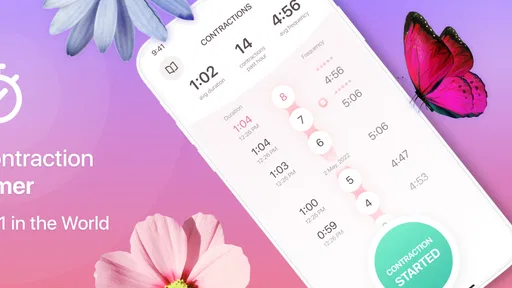
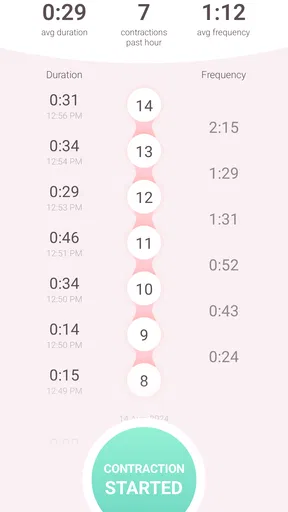
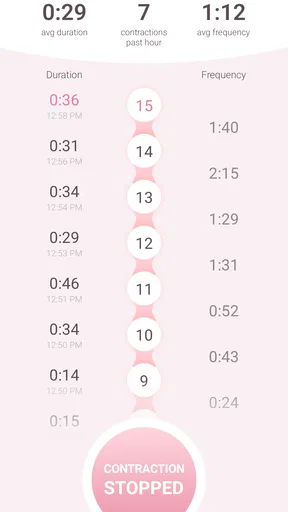
Using the app is as simple as it gets. When you feel a contraction coming on, you hit the big friendly "Start" button. Once the contraction eases, you hit "Stop." The app automatically logs the duration and frequency of each contraction, making it easy for you to see patterns or changes over time.
What’s even cooler is how the app presents this information. You get a clear timeline and summary of each contraction session. It’s like having a mini personal assistant who’s solely focused on your labor progress.
A realistic workflow is to let the person in labor concentrate on the moment while a companion operates the timer. After several entries, the companion can look at the record rather than asking the person to recall exact start times. That can make a phone call more focused: you can explain that you have been timing contractions and share the recorded pattern if it is useful, while still following the guidance you have received from your care team.
One practical trade-off is that every timed event depends on a human tapping at the right moments. If you start late or stop after the contraction has already eased, the entry will not perfectly reflect what happened. I would not try to correct every imperfect tap while labor is underway; a consistent, approximate record is often more helpful than interrupting the person to chase precision.
Features You’ll Love
Now, let’s dive into some of the features that make this app a must-have:
- User-Friendly Interface: No complicated menus or settings. The app is designed to allow you to start tracking immediately.
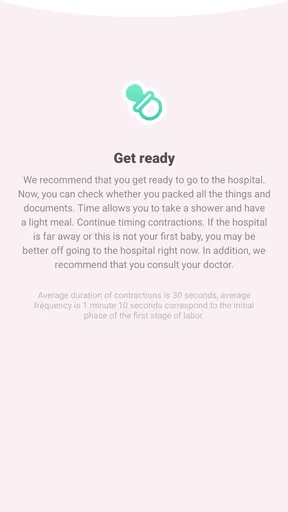
- Notification Alerts: You can set up notifications to remind you when it's time to head to the hospital based on the contraction patterns.
- Shareable Reports: Easily share your contraction data with your healthcare provider or support person via email or messaging services.
- Multiple Language Support: The app supports several languages, making it accessible to a wider audience.
The handoff is one of the more useful parts of the workflow. Instead of trying to recount every contraction from memory, you can use the session summary as a prompt when speaking with a support person or healthcare provider. Sharing a report may help you communicate the record, but it does not mean the recipient has seen it automatically; you still need to choose how and with whom to share it.
Notifications can be convenient, but I would not treat an alert as medical clearance or as a substitute for your clinician’s instructions. If you have been told to call at a particular point, follow that guidance rather than waiting for an app reminder. Similarly, the report is best understood as supporting information: your symptoms, circumstances, and care plan matter too.
Compared with a paper note or a basic stopwatch, the app can keep the timing entries together and present them as a session rather than leaving you to calculate or organize them yourself. A stopwatch may be preferable if you want nothing beyond a simple time measurement, and paper can work when a phone is unavailable or someone prefers writing. The app’s advantage is the combination of a dedicated timing flow and a shareable record; its trade-off is that you need a working phone and someone able to operate it.
Choosing the right person to handle the phone
For a first-time parent, the timer can be reassuring because it gives a companion a concrete task without requiring them to interpret every sensation. For someone who has given birth before, it may be useful as a quick way to check whether the current experience is developing differently from what they expected. In either case, I would decide beforehand whether the laboring person or their support person will keep the entries. The best arrangement is the one that does not add pressure or turn each contraction into a performance to be measured.
This app is less suitable for anyone who expects it to provide personalized medical advice, diagnose labor, or replace contact with a healthcare professional. It is also not the best fit if using a phone makes you more anxious, if you do not want to share digital records, or if your care team has given you a different method to follow. A simple paper log or a companion’s notes may be a calmer choice in those situations.
Why You Should Download It
Let’s be real, the last thing you need during labor is extra stress. The Contraction Timer & Counter 9m app takes one major thing off your mind by tracking contractions for you. It’s like having a calm and collected friend by your side, ensuring you have all the data you need, right when you need it.
Another great thing? You don’t have to worry about privacy. The app doesn’t require any personal information to function, so you can focus on what truly matters—welcoming your new baby into the world.
Before relying on any timer, I would also think through the ordinary logistics: keep the device somewhere reachable, make sure your support person can access the app, and avoid letting the screen distract from comfort or safety. If the phone needs to be handed to someone else, a brief explanation of the start-and-stop routine is enough to make that handoff smoother. You do not need to build a complicated tracking system around a tool whose main strength is being quick to use.
People often wonder whether a contraction timer can tell them when to leave for the hospital. I would not use this one—or any timer alone—as the authority on that decision. Its alerts and timing record can help you notice a pattern, but the right next step depends on the advice from your care team and your circumstances. If you are unsure, contact them rather than waiting for a pattern to satisfy an app.
Another reasonable question is whether it is useful when contractions are irregular. It can still help you record what is happening, but an uneven pattern may be harder to interpret and does not make the app a source of diagnosis. Likewise, you can share a report when that is helpful, but a phone summary cannot replace a direct conversation about how you feel. These distinctions are important: the app organizes observations; it does not decide what they mean for your care.
Wrapping It Up
In summary, the Contraction Timer & Counter 9m app is a simple yet effective tool that can make a huge difference during labor. It’s thoughtfully designed, easy to use, and packed with features that really matter. If you’re expecting and want to have an organized, stress-free way to track your labor progress, this app is definitely worth checking out.
So, go ahead and download it before you head to the hospital. Trust me, you’ll be glad you did!
My recommendation is to install it in advance, try the basic controls once, and decide who will manage the timing if labor begins. With that preparation, it can serve as a straightforward record-keeping companion rather than another task to figure out at a difficult moment. Keep its role modest, follow your care team’s instructions, and use the information only when it helps you communicate more clearly.
Pros
- Intuitive interface for easy tracking.
- Customizable alerts for contractions.
- Data export for medical consultations.
- Offline functionality available.
- Supports multiple languages.
Cons
- Ads can be intrusive at times.
- Limited free features without upgrade.
- Requires manual input for accuracy.
- No integration with wearable devices.
- Lacks community or support forum.
FAQs for Contraction Timer & Counter 9m
What is Contraction Timer & Counter 9m used for?
Contraction Timer & Counter 9m is designed to help expectant parents track the duration and frequency of contractions during labor. This app provides an easy-to-use interface for timing contractions, assessing patterns, and determining when it's time to head to the hospital or birthing center. It's an essential tool for managing and understanding labor progress.
How user-friendly is Contraction Timer & Counter 9m?
Contraction Timer & Counter 9m is highly user-friendly, featuring a simple and intuitive interface. Users can start and stop the timer with a single tap, and the app automatically records each contraction's duration and interval. Additionally, it displays data in easy-to-read charts, making it accessible for anyone, even in stressful situations.
Is Contraction Timer & Counter 9m available on both Android and iOS?
Yes, Contraction Timer & Counter 9m is available for download on both Android and iOS platforms. Users can find the app in the Google Play Store and the Apple App Store, ensuring compatibility with a wide range of devices. This availability makes it convenient for most smartphone users.
Does Contraction Timer & Counter 9m offer any additional features?
Beyond basic timing, Contraction Timer & Counter 9m includes features such as contraction history logs, customizable alerts, and the ability to share data with healthcare providers. These features enhance its functionality, providing comprehensive support for users throughout the labor process.
Is there a cost associated with using Contraction Timer & Counter 9m?
Contraction Timer & Counter 9m offers a free version with essential features. However, there may be in-app purchases or a premium version available, which unlocks additional features or removes ads. Users should check the app store listing for detailed pricing information to understand any potential costs.


